

How to Check Your Website’s Accessibility in Germany and Avoid a Fine of Up to €100,000

 Business / Grants
Your online store may look modern, load fast, and reliably process orders — yet still be inaccessible to part of your customers and out of compliance with the Barrierefreiheitsstärkungsgesetz (BFSG), Germany’s digital accessibility law.
Since 28 June 2025, digital accessibility requirements have been in force in Germany. Oversight is carried out by the Marktüberwachungsstelle der Länder für die Barrierefreiheit von Produkten und Dienstleistungen (MLBF) — a joint body of all 16 federal states, headquartered in Magdeburg. The authority began operating in September 2025 and moved into an active enforcement phase in January 2026.
Results from the first large-scale reviews revealed how serious the problem is: a study by Aktion Mensch, Google, and the Pfennigparade foundation, which tested the 71 most-visited online shops in Germany, found that four out of five sites (80%) were inaccessible to people with disabilities. Another study, covering nearly 2,500 German online stores, found that only about 1% of the sites reviewed fully met BFSG requirements.
Non-compliance can lead not only to lost customers but also to a regulatory investigation. MLBF fines can reach €100,000 for a serious violation; less severe violations carry lower fines.
Let’s break down how to know whether the law applies to your company, which mistakes come up most often, and why an automated check isn’t enough.
What’s changed for businesses in Germany
The Barrierefreiheitsstärkungsgesetz, or BFSG, is Germany’s national law implementing the European Accessibility Act (EAA). It sets accessibility requirements for certain products and services for people with disabilities.
For e-commerce, this means a person must be able to independently:
- find the product or service they need;
- review the offer;
- select the necessary options;
- register or log into an account;
- add an item to the cart;
- fill out a form;
- choose a delivery method;
- pay for the order;
- receive purchase confirmation;
- contact customer support.
The website must work with more than just a mouse. It must be usable by people relying on a keyboard, a screen reader, voice control, text magnification, and other assistive technologies.
In Germany, oversight of e-commerce service accessibility falls to the MLBF. The authority accepts consumer complaints and independently selects websites and apps for review.
Does the BFSG apply to your company
The requirements can apply not only to companies registered in Germany. If a business offers goods or services to German consumers, its digital service may fall under European and national accessibility rules.
Companies at risk include:
- online stores;
- marketplaces;
- booking websites;
- food delivery and transport services;
- sites with paid or free subscriptions;
- ticket sales platforms;
- apps that let a consumer order, buy, rent, or book a service.
An exemption exists for micro-enterprises. It applies if a company has both fewer than 10 employees and annual turnover (or annual balance sheet total) of no more than €2 million — both conditions must be met at the same time.
If either threshold is exceeded, the requirements may apply to the company.
It’s also worth noting that responsibility stays with the service owner. If an agency built the site, checkout runs through a third-party module, and payments are handled by an external provider, that doesn’t release the business from the obligation to provide an accessible user journey.
How to tell if your site may be inaccessible
You don’t need to start with a complex technical analysis to spot part of the problem. Try completing the main actions on your site without a mouse.
Watch for the following signs:
- you can’t reach the button you need using the Tab key;
- it’s unclear which element is currently selected;
- menus, filters, or product options don’t open with the keyboard;
- images lack meaningful text descriptions;
- a form communicates an error using color alone;
- nothing is announced after adding an item to the cart;
- a CAPTCHA blocks moving to the next step;
- text becomes unreadable or disappears when zoomed in;
- checkout can’t be completed without a mouse;
- buttons have unclear labels like “click here”;
- form fields lack visible or programmatic labels;
- the payment window is inaccessible to a screen reader.
Even one such error can stop a customer completely. Problems in the cart, registration forms, and at checkout are especially critical.
Not sure if your website meets the requirements?
A quick automated scan can only show part of the picture. To understand the real risk, you need to check key templates and the user journey from product selection to payment.
Book a free initial consultation with DigiWay. We’ll help determine whether BFSG requirements apply to your service, which parts of the site to check first, and what audit format fits your project.
Why AI and automated scanners don’t replace an audit

Automated tools are useful: they quickly catch insufficient contrast, some HTML errors, missing attributes, and part of form-related issues.
However, no scanner can fully confirm a site’s accessibility. The W3C states directly that automated tools can only assist in evaluation — determining real accessibility requires professional manual testing.
A tool can detect that an image has alternative text. But it can’t always tell whether that text accurately conveys the meaning of the image.
It can check that a button exists in the code, but not whether a screen reader user can understand its purpose and complete a purchase.
AI also can’t reliably evaluate the full user experience. It can speed up analysis, classify errors found, or help a developer fix code. But it doesn’t replace testing the site with a keyboard, a screen reader, and other assistive technologies.
So a “100 score” from an automated tool doesn’t mean the site complies with the BFSG or WCAG.
Why an accessibility widget isn’t a solution either
Some services offer to install a widget on your site that adjusts contrast, enlarges text, or adds extra display settings.
Such a widget can be a helpful supplementary feature, but it doesn’t fix the site’s core problems:
- incorrect page structure;
- inaccessible forms;
- keyboard navigation issues;
- focus errors;
- an inaccessible cart;
- unclear error messages;
- incompatible checkout;
- issues with third-party payment modules.
A widget can’t guarantee that a person can independently find a product, complete an order, and finish payment. That’s why installing one doesn’t replace a professional audit and fixes to the site itself.
What an accessibility audit covers
A professional audit needs to answer the main question: can a person with a disability independently use the digital service and complete the action they need?
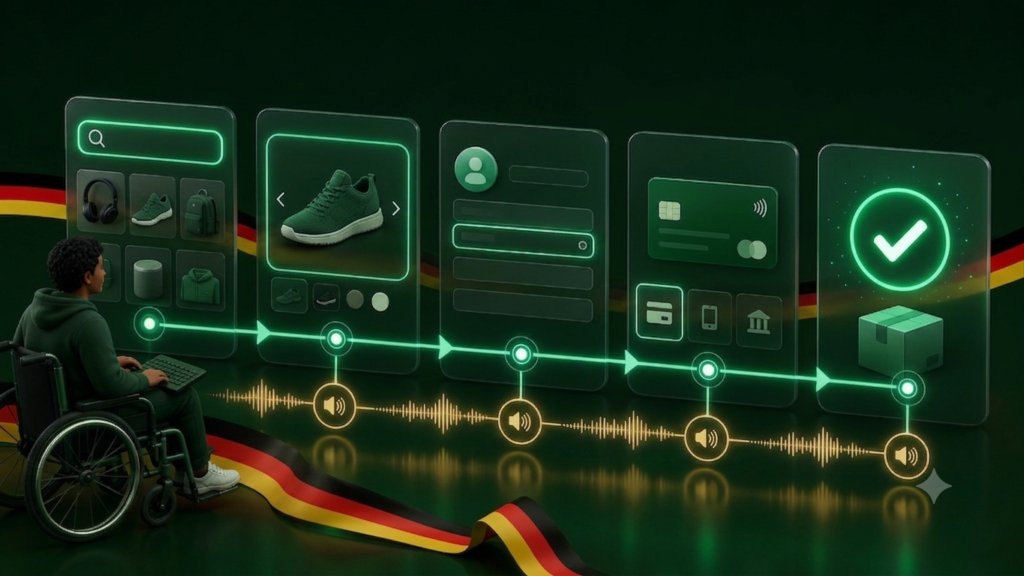
The review covers more than the homepage. A specialist analyzes key templates and scenarios:
- catalog and search;
- product page;
- filters;
- forms;
- account area;
- cart;
- checkout;
- payment;
- order confirmation;
- customer support.
The work combines automated tools with manual testing against WCAG. Special attention goes to critical barriers that fully block a purchase or the use of the service.
At the end, the company gets more than a list of errors — it gets a clear action plan:
- which issues need to be fixed first;
- how they affect users;
- exactly where the error occurs;
- what changes are needed in design, code, or content;
- what needs to be retested after the fix.
It’s especially convenient for a business when one team can both run the audit and implement the fixes. This shortens the path from report to working result and reduces the risk of the recommendations being misread.
What can happen if you’re not compliant
The MLBF can receive a complaint from a user or independently select a site for review. In its assessment, the authority considers how serious the issue is and what actions the company is taking to fix it.
If a problem is found, the authority can require the company to fix the violations within a set deadline. If the company fails to comply, the regulator can restrict or prohibit the service from being offered on the German market, and can also impose a fine.
The most serious risk arises when a company:
- doesn’t check accessibility at all;
- doesn’t respond to user complaints;
- ignores critical issues;
- provides incomplete information;
- fails to meet the regulator’s deadline for corrections;
- shows no real effort toward compliance.
A fine isn’t issued automatically for every site with an error. But waiting for the regulator’s first contact is a risky strategy. Rushing fixes on a live online store usually costs more than a planned audit and phased rollout of changes.
Beyond possible penalties, an inaccessible site means lost orders. If someone can’t open a menu, select a product, or click the payment button, they’ll likely go to a competitor.
The most common business mistakes
Companies usually go wrong not because they ignore accessibility entirely, but because they settle for too simple a solution.
Mistake 1. Checking only the homepage
The main barriers are often in forms, the cart, login, and checkout. A good homepage score says nothing about whether someone can actually complete an order.
Mistake 2. Relying only on an automated report
A scanner shows part of the technical errors, but it doesn’t test the real user journey.
Mistake 3. Installing a widget and considering the issue closed
A widget doesn’t fix the code, structure, or logic of the interface.
Mistake 4. Getting a report but never implementing the fixes
The audit itself doesn’t make a site accessible. Technical changes and retesting are needed after the review.
Mistake 5. Treating accessibility as a one-time job
A new plugin, a design update, a change to the payment module, or new content can reintroduce problems. Accessibility needs to be monitored after any significant site update.
When to get an audit
Don’t delay a review if:
- your company sells goods or services to consumers in Germany;
- your business has 10 or more employees;
- annual turnover exceeds €2 million;
- your site or app allows a contract to be concluded online;
- checkout was recently updated;
- you use third-party forms or payment modules;
- the company has received an accessibility complaint;
- an automated scan has already surfaced errors;
- you don’t know whether a user can complete the entire journey using only a keyboard.
The earlier systemic problems are found, the easier it is to fold the fixes into your development plan.
Order a DigiWay accessibility audit
DigiWay audits the digital accessibility of websites and online stores, combining automated analysis with manual review of key user scenarios.
We can help you:
- define the scope of the audit;
- check the site against WCAG requirements;
- find critical barriers;
- prepare a prioritized remediation plan;
- make the necessary changes to design and code;
- retest the site after implementation;
- set up ongoing accessibility monitoring.
You’ll get more than a formal automated report — a practical plan tied to the real pages, components, and scenarios of your site.
Frequently asked questions
Is an independent WCAG audit required?
An independent certificate or audit is not formally required. What’s required is that the service itself is accessible. A professional audit helps uncover issues that can’t be reliably found with automated tools alone, and helps prepare a remediation plan.
Can a website be checked for free?
A free scan is useful for an initial assessment, but it doesn’t confirm compliance. A full result requires manual testing of the main templates and user scenarios.
Does the BFSG apply to a company outside Germany?
The requirements can apply if a company offers relevant goods or services to consumers in Germany, regardless of where the business is registered. Applicability should be assessed based on the specific business structure and national rules.
Do we need to build a new website?
Not necessarily. In many cases, issues can be fixed in stages, starting with the cart, forms, checkout, and other critical scenarios. The right approach is decided after auditing the current site.
How long do audit results remain valid?
An audit reflects the state of the site at the time of the review. After significant changes to design, code, plugins, content, or payment modules, critical scenarios need to be retested.