

WordPress store (WooCommerce) integration with PC-Market: how it works and how to implement it

 Development
What does WordPress store integration with PC-Market involve?
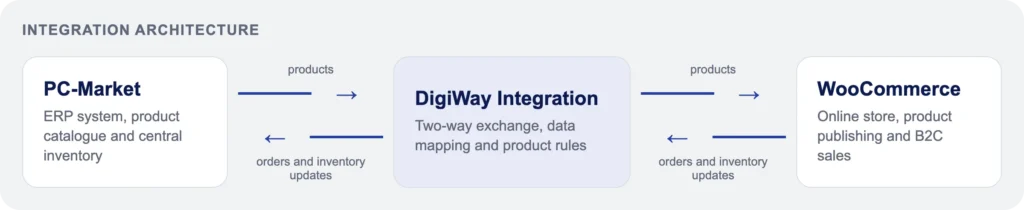
Integrating an online store with PC-Market connects WooCommerce on WordPress with an ERP system to automatically exchange data on products, stock levels, prices, and orders. Its practical goal is one consistent database for online and in store sales.
PC-Market supports sales and warehouse processes, while WooCommerce presents the assortment to customers and takes orders. Without a link between these systems, the team has to manually transfer data, check product availability, and pass orders into the sales system.
A well designed PC-Market and WooCommerce integration defines which system is the source of specific data. For example, the ERP can own price, EAN code, and stock, while WordPress owns the marketing description, photos, and category content. This two way data exchange reduces discrepancies but requires business rules to be agreed in advance.
Case study: PC-Market and WooCommerce integration for Valeksa Market
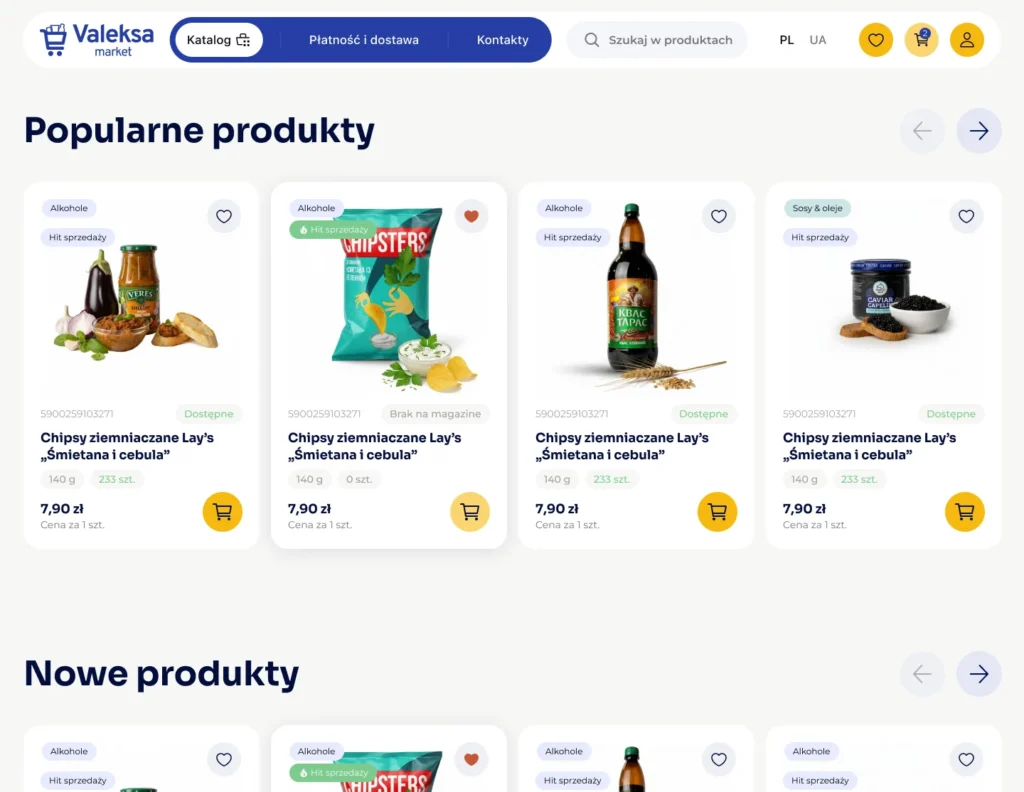
Valeksa Market is an online store selling Ukrainian products, whose online sales needed a connection to data handled in PC-Market. The goal of the project, delivered by DigiWay, was to build a stable and controlled flow of products, stock levels, and orders between the ERP and WooCommerce.
This wasn’t just about pushing a catalog across technically. What mattered was correctly reflecting the specifics of the assortment and leaving the store team in control of the quality of the published offer. The points below show how such a process can be designed.
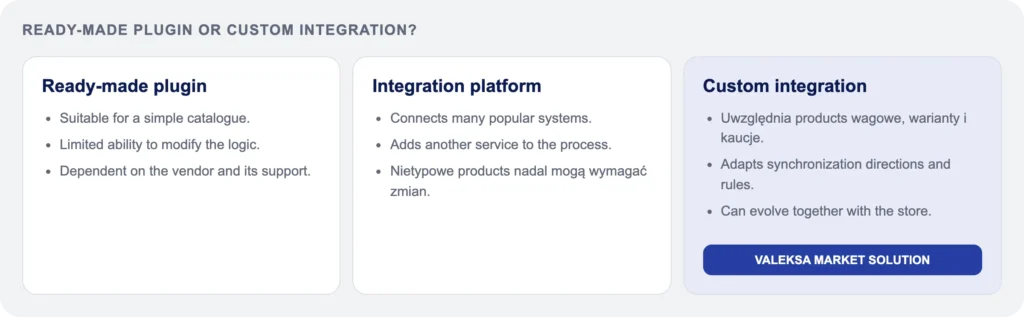
Why didn’t off the shelf plugins solve the problem?
Before starting the work, available plugins and integration solutions on the market were reviewed. Standard solutions couldn’t reliably handle all the catalog requirements and the full Valeksa Market sales process.
That doesn’t mean ready made tools are useless. They often work well for simple products and basic synchronization. In this project, though, their capabilities didn’t match the specifics of the data or the way products were prepared for publication.
Vendor support didn’t lead to a solution that would let the implementation be completed safely. So after the analysis, the team decided to build a custom integration based on the store’s actual needs.
Simple, variable, and weighed products, plus deposit packaging
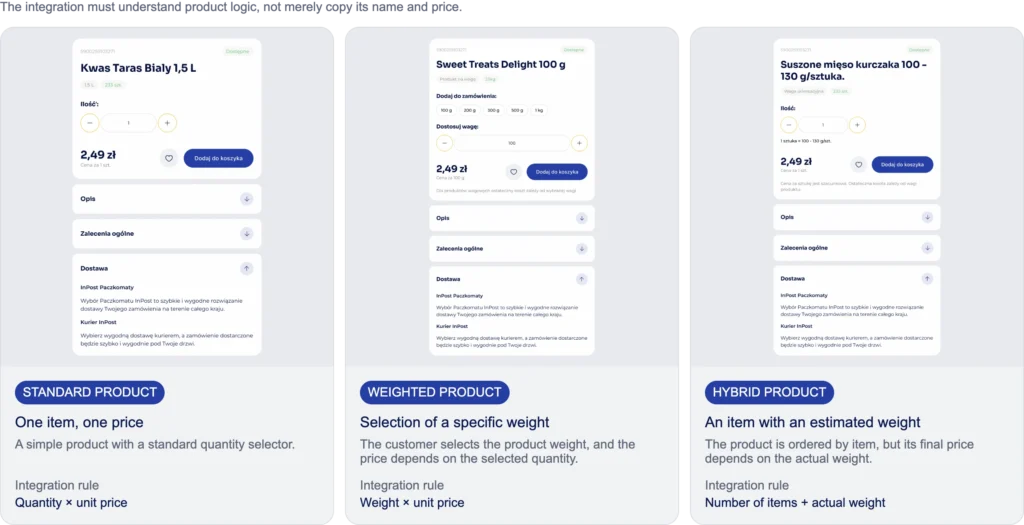
The Valeksa Market catalog included simple products, products with variants, goods sold by weight, and beverages and other items in packaging with a deposit value. Each of these groups needs its own approach to interpreting data between PC-Market and WooCommerce.
Sending the name, price, and quantity alone isn’t enough. You need to determine whether a product is sold as a single unit, a variant, a specific weight, or an item with an added deposit value. Units of measure, identifiers, EAN codes, and the links between a parent product and its variants matter too.
Before configuration, these rules should be written down in business terms. Only then can they be translated into a data mapping that both systems interpret the same way.
How does the custom Valeksa Market integration work?
The project uses a process that separates operational data from the ERP from the sales content that makes up the store’s offer. It works through the following steps:
1. The product is prepared in PC-Market as the source of operational data.
2. The integration sends it to WooCommerce as a draft.
3. The store manager adds photos, description, buyer information, and the rest of the sales content.
4. Once approved, the product is published in the online store.
5. Stock levels are synced between the systems.
6. An order placed in WooCommerce is sent to PC-Market for further processing.
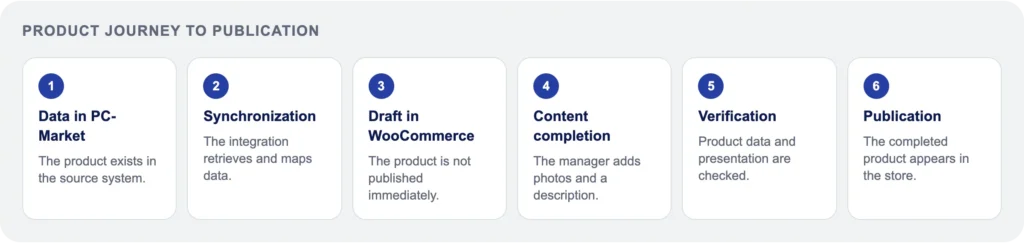
This model protects the store from automatically publishing unfinished product pages. At the same time, the team doesn’t have to manually retype basic operational information such as name, code, or warehouse data.
Result: one process for the online store and PC-Market
Valeksa Market runs connected to PC-Market while keeping control over how the offer gets published. Products land in WooCommerce as drafts, and the store team decides when they’re ready to show customers.
Stock levels stay synced, and online orders get passed to the sales system. This lets product content be developed in WooCommerce without manually retyping basic ERP data. It’s a change to the workflow, not a promise to eliminate every possible error.
The PC-Market integration was part of a broader e-commerce project for Valeksa Market. The project also included the development of a WooCommerce store and solutions supporting the day-to-day management of the product catalog. View the full Valeksa Market case.
What data does PC-Market sync with WooCommerce?
The scope of PC-Market and WooCommerce synchronization depends on the system version, the company’s operating model, catalog structure, and the chosen integrator’s capabilities. What matters most is defining which data should be transferred, in which direction, and which system owns it.
| Data area | Typical flow direction | Purpose |
|---|---|---|
| Products, EAN codes, units of measure | PC-Market → WooCommerce | Creating and updating product pages |
| Sales content and photos | WooCommerce | Presenting the assortment in the store |
| Stock levels | PC-Market → WooCommerce | Availability information |
| Prices and promotions | PC-Market → WooCommerce or two way | Offer consistency |
| Orders and buyer data | WooCommerce → PC-Market | Sales processing |
| Order fulfillment status | PC-Market → WooCommerce | Keeping the customer informed |
Products, variants, and descriptions
Importing product pages can cover the name, category, EAN code, unit of measure, price, and other fields defined in the mapping. Persistent identifiers matter most, since they let the system tell whether it should create a new product or update an existing one.
At Valeksa Market, a product from PC-Market shows up in WooCommerce as a draft. Before publishing, the manager adds photos, description, and sales content. This approach makes it possible to handle simple, variable, and weighed products without mixing operational data with customer facing material.
Stock levels, prices, and availability
PC-Market can serve as the source of stock levels, prices, and availability information. This matters especially when the same warehouse serves both online and in store sales.
Up to date data reduces the risk of accepting an order for something that’s no longer in stock. It doesn’t, though, replace clearly defined rules, for example around reservations, cancellations, and data refresh. Sync frequency should be matched to the pace of sales and the company’s processes.
Orders and fulfillment statuses
Once an order is placed, WooCommerce can send buyer data, order items, quantities, and delivery and payment method to the ERP, within the scope agreed during implementation. That means staff don’t have to re enter the order into the sales system.
Handling documents and statuses in PC-Market is a separate step. The integration can also send selected fulfillment statuses back to the store so the customer gets current information. The scope of these statuses should be clearly defined so store messages match the actual stage of order processing.
What does a company gain from integrating PC-Market with e-commerce?
Connecting ERP and e-commerce makes sense when it improves the daily work of the store, the warehouse, and customer support. Well configured automation cuts manual work, helps keep the assortment current, and speeds up order processing.
It’s not a fully hands off process, though. The company still needs someone owning the process, exception handling, and clear rules for updating the catalog.
Fewer errors, less manual work
Automatic import reduces the need to copy names, EAN codes, prices, or stock into the store’s admin panel. Passing orders to PC-Market also cuts down on manually retyped line items and buyer data.
This lowers the risk of mistakes but won’t fix incorrect source data. If the catalog has duplicates or ambiguous codes, they need cleaning up before the integration goes live.
Consistent stock for online and in store sales
When online and in store sales share a warehouse, availability in WooCommerce should reflect data from the sales system. This makes it easier to react to sales happening across different channels.
You also need to define rules for reserving stock and how discrepancies get handled. Accurate stock levels depend not just on the integration but also on correctly recording deliveries and sales in PC-Market.
Faster customer service and order fulfillment
Access to current data makes it easier for the team to confirm availability, pick an order, and keep the buyer informed on progress. The warehouse works from data passed in from the online channel instead of reconstructing the order from a message or printout.
For the customer, this means a clearer offer and fewer cases where the store has to correct an order after purchase. The benefit comes from an organized process, not just from installing a plugin.
Off the shelf plugin, integrator, or custom PC-Market integration?
The choice of solution should be based on the sales process, product types, and growth plans, not just the starting cost. It’s worth considering ready made plugins, middleware platforms, and a custom integration module.
[INFOGRAPHIC NEEDED HERE: a diagram comparing a ready made plugin, a middleware platform, and a custom PC-Market and WooCommerce integration]
When is a standard solution enough?
A ready made plugin can be enough for a simple catalog, standard products, and basic syncing of prices, stock, and orders. The condition is confirming compatibility with your specific PC-Market version and WooCommerce setup.
Before buying, it’s worth testing real scenarios: creating a product, changing a price, updating stock, and passing an order through. A feature list in the tool’s description doesn’t replace that check.
When is a custom module needed?
A custom module becomes worthwhile when a company needs special logic for weighed products, variants, deposit values, returnable packaging, multiple warehouses, or non standard statuses.
Valeksa Market is one example, where ready made solutions couldn’t correctly handle the full process and the different product models. Not every store needs a custom build. The decision should be preceded by an audit of the catalog, the data, and the critical sales scenarios.
The role of middleware platforms and integrators
A middleware platform can simplify connecting systems, especially if a company runs multiple sales channels or wants to manage data exchange centrally. It can also speed up implementation for typical processes.
Even so, you need to check whether the tool carries over every field you need and handles the exceptions that matter to your business. The choice comes down to data volume, catalog complexity, warehouse processes, and the technical capabilities of the existing systems.
How does implementing a PC-Market and WooCommerce integration work?
Integration should be rolled out in stages: from data and process analysis, through setup and testing, to a controlled launch in the live environment. Configuration without testing can disrupt catalog publishing, product availability, and order processing.
The process should involve staff responsible for the store, the warehouse, sales accounting, and the technical side. Every stage needs sign off from someone who knows that part of the work.
[INFOGRAPHIC NEEDED HERE: a checklist of implementation stages for the PC-Market and WooCommerce integration]
Process audit and data preparation
The audit covers the product catalog, identifiers, EAN codes, categories, prices, warehouses, and order flow. It’s worth defining which fields are mandatory in each system and where exceptions come up.
The integration won’t automatically fix incorrect or duplicated source data. Before the work starts, the catalog needs cleaning up, a data owner needs to be assigned, and rules for handling non standard products need approval.
Configuration, testing, and launch
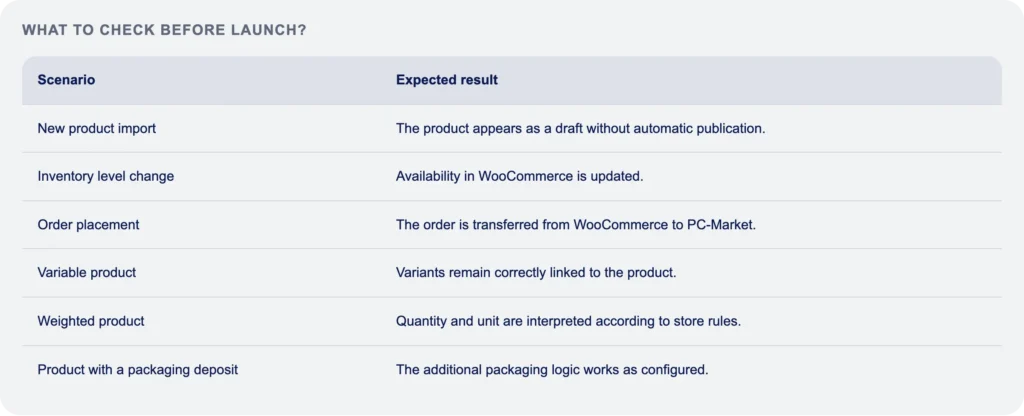
After field mapping, trial syncs should run in a test environment or on a safely chosen data subset. Tests should cover a stock change, a price change, a new order, a cancellation, and a variable product.
Handling exceptions matters too: a missing code, an incompatible unit of measure, or a product that can’t be published. Only once the business users approve the results should the live launch be scheduled.
Launch and flow monitoring at Valeksa Market
At Valeksa Market, checking the implementation covered the whole process, not just a single record transfer. The product had to be created in WooCommerce as a draft, then filled in by the manager and published.
The next scenarios covered updating stock and sending a test order to PC-Market. This approach makes it possible to assess whether both the product data and the sales fulfillment process work correctly together.
What to watch out for with weighed products, deposit values, and variants?
Weighed products, returnable packaging, deposit values, and variants all need rules defined before the integration is set up. Both systems need to interpret the sales unit, price, availability, and how extra amounts are shown to the customer the same way.
For weighed products, you need to define the unit of measure, how price and quantity are displayed, and the rules for fulfilling an order if the final weight differs. Variants, in turn, need attributes like flavor, volume, or size correctly linked to the right codes and stock.
A deposit value shouldn’t be treated as a random note in the product name. You need to decide how it shows up in the cart, how it affects the order price, and how it gets passed to the sales system. It’s worth confirming these arrangements with whoever’s responsible for sales rules and transaction records too.
Monitoring the integration and its evolution after launch
Launching the integration isn’t the end of the work. The catalog changes, new processes come up, and WordPress, WooCommerce, and PC-Market can all get updated. Staying stable requires monitoring the data flow and having a procedure for handling errors.
In practice, it’s worth using logs, alerts, and processing queues if the solution supports them. Controlled retry attempts after a temporary error are useful too, instead of manually rebuilding the whole process.
The company should assign someone to own the process, who reviews error messages and reaches out to the technical team. It’s also worth planning ahead for growth: an extra warehouse, a new sales channel, or a change to the catalog model may call for extending the mapping. If you want to check the data scope and risks before starting work, describe your project and book a free consultation.
FAQ
Can PC-Market be integrated with any WooCommerce store?
Technically the integration is possible for many WooCommerce stores, but the scope won’t be the same in every case. It depends on the PC-Market version, data quality, the WooCommerce plugins in use, product types, and expected order volume. Before implementation, it’s worth reviewing the catalog, prices, warehouses, and exceptions. Only then can you tell whether a standard tool is enough or a custom module is needed.
How often should PC-Market and WooCommerce stock levels sync?
Sync frequency should be matched to the pace of sales and the risk of selling stock that’s no longer available. A store with frequent online and in store sales usually needs faster updates than a company with a small number of orders. You also need to account for reservations, cancellations, and how stock gets updated in PC-Market. Business requirements come first, and the technical integration capabilities follow.
Does the PC-Market and WooCommerce integration support weighed products and deposit values?
It can support weighed products and deposit values, as long as the mapping rules for them are designed and tested. An off the shelf solution doesn’t always correctly handle units of measure, variable weight, returnable packaging, or an added deposit value. You need to define how price and deposit are displayed in the store, how the data is sent to the ERP, and how these line items get handled in an order.
How long does it take to implement an online store integration with PC-Market?
The timeline depends on the complexity of the catalog, the data, and the sales process, so it should be set by analysis rather than a general estimate. A simple sync can need less work than an integration covering variants, weighed products, deposit values, multiple warehouses, and non standard statuses. The schedule needs to include the audit, data preparation, configuration, testing, and business sign off.
Is a ready made plugin enough for a PC-Market and WooCommerce integration?
A ready made plugin can be enough for a simple catalog and a standard data flow, but it still needs checking before launch. You need to test compatibility with your specific PC-Market and WooCommerce setup, plus the critical scenarios: updating prices, stock, variants, and orders. If the store uses non standard products or processes, a custom solution may be the safer choice.